












A username on social media platforms is not just a name; it is equivalent to a digital identity.
That is, a simple username is all others need to find, follow, and perceive someone beyond the screen.
So, keeping a unique name can give a different nudge to your digital personality.
Especially on TikTok, choosing a unique username can dynamically change how you brand yourself.
Making you stand out amidst the crowded influencer zone.
So, TikTok offers a simple process to change both the profile name and username. Allowing users to rebrand themselves as they grow their businesses.
Now, in this blog, I will address the burning question — “How to change name on TikTok?” — by exploring the diverse methods, common issues, and more.
So, keep reading to know more!
TikTok Name vs Username: What Are The Key Differences?
Although both profile and username seem like two sides of the same coin, they are not. For instance, the profile or display name on TikTok refers to the original name of the user.
That is, it does not need to be something creative or unique. Rather, it is just the simple name that the user probably goes by in the real world.
But the username acts as the digital identity on the platform.
That is, it is a unique name created with characters, numerics, and special characters that separates the user from others with a similar name on the app.
So, it is always creative and unique. Giving the user some edge in the niche for branding and online memorability.
How To Change Name On TikTok? A Step-by-Step Guide For Android Users
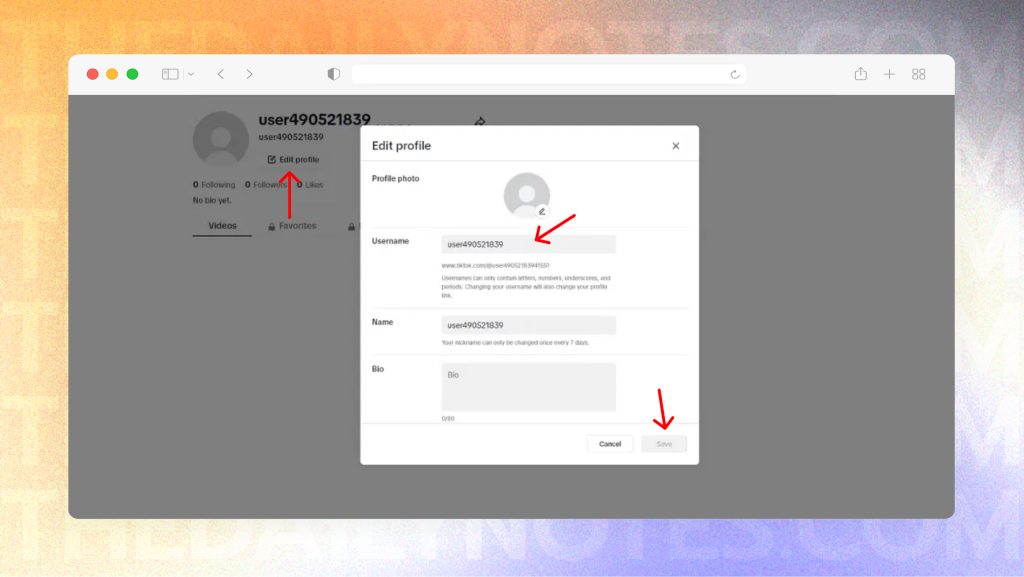
Since both the profile name and username are set by the user, TikTok allows them to change them occasionally.
So, users can rebrand their accounts. Making them more engaging and memorable in the social media world.
1. Change Profile Name
Now, if you want to change the display name on your TikTok profile, here are the steps for Android users—
- Open the TikTok app and go to your Profile.
- Then, on your profile page, click on the Edit Profile button. Usually, it is right under your profile picture and bio section.
- After that, in the Edit menu, find the ‘Name’ section and click on it. This will open the name bar.
- Then, type in the name you want to use. Since it is the profile name, you can include spaces and avoid creativity.
- Finally, click on the Save or the Tick button to confirm the name change. This way, your display name will change on the Profile.
2. Change Username
But if you want to change your username, you need to follow a different set of steps. So, here are the steps to change your TikTok profile username on Android devices—
- Firstly, you need to open the TikTok app and go to your Profile.
- Then, from under your profile picture and bio, click on the Edit Profile option. This will open the menu to edit your profile.
- After that, scroll down the Edit menu and find the ‘Username’ option and click on it. This will open the username panel.
- Now, you can be creative and innovative with the username. So, type in a unique name with numerics, letters, underscores, and dots.
- Moreover, once the unique name is typed in, TikTok will notify if it is already in use. So, you can edit it until it is unique.
- Finally, click on the Save option or the Tick button to confirm the change of the username.
What To Avoid While Changing Names On TikTok?
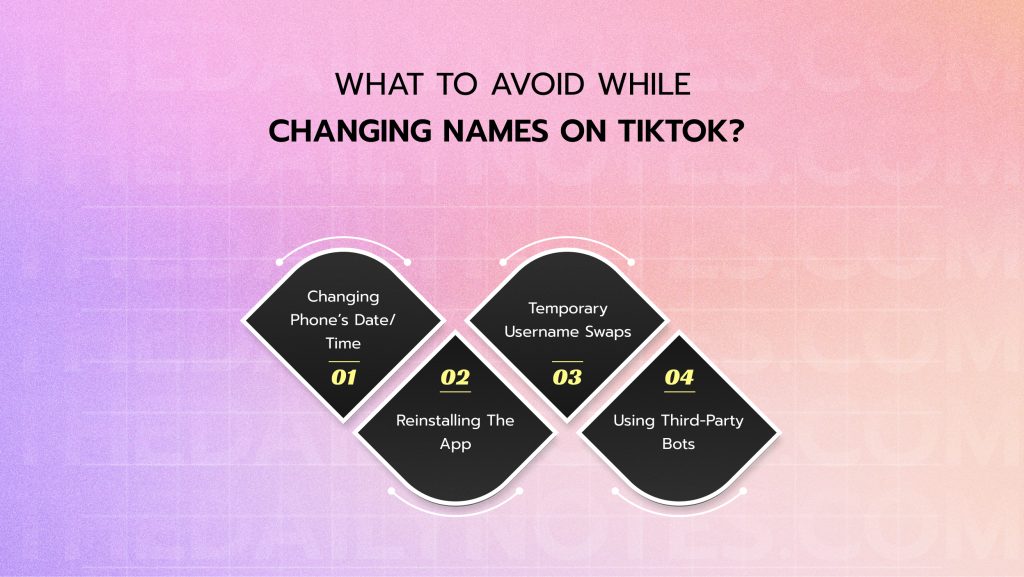
Even though TikTok has made the process easy-peasy, many users follow myths and common online claims. So, here are some things to avoid while changing the names—
- Changing Phone’s Date/Time: Since the username’s availability is determined by TikTok’s servers, changing the date and time does not affect it.
- Reinstalling The App: Moreover, reinstalling the app only refreshes the local installation. So, it cannot suddenly make a username available.
- Temporary Username Swaps: Also, even when you change your username, your last username remains unavailable for another 30 days. So, you cannot swap temporarily.
- Using Third-Party Bots: Finally, using any third-party tools or bots to change the names can breach the platform’s policies. So, better avoid it.
Troubleshooting Methods For Common Challenges
Although the steps to change the name and username on TikTok are quite simple, users can face issues. So, here are some troubleshooting methods for common issues—
- If the username is not available, try modifying it with numbers and underscores.
- Moreover, if the link from bio and other places is removed after updating the username, reattach the links.
- Alternatively, if the Edit Profile menu is not opening, then update the app or reinstall it to clear the cache.
But if none of these methods work, then it is better to contact the TikTok support line. They can guide you through the process and help you resolve the issue in a jiffy.
So, what’s stopping you from rebranding yourself on TikTok? Get on the app and change your name with a touch of uniqueness and creativity.
FAQs
In this part, I have delved into the various commonly asked questions around the name-changing process of TikTok.
1. Can I Change My TikTok Name On Android?
Yes, absolutely. Similar to iPhone users, Android users can change their TikTok display name and username. But the process is different than that of iPhone models.
That is, users need to go to their Profile on TikTok and select the Edit option. Then, they can change their profile name or username. Finally, they need to confirm the change.
2. How Often Can I Change My TikTok Username?
Usually, users are allowed to change their username or display name once in 30 days. So, you can change the name on TikTok once a month at most.
3. Will Changing My Username Break Links To My Profile?
Yes, absolutely. Since the link to your profile is directly generated and attached to the username, changing it will break the link. That is, your profile URL gets changed.
But you can update the links with the new URL that includes the changed username in your bio, page, and other social media platforms.
4. Will I Lose Verification If I Change My Username?
Since the verification is provided on the profile name, changing the username can possibly lose the verification. So, you can lose the verification badge.
But if you request re-verification, TikTok can reassess your profile name and verify the account. So, you can get the badge back with the verified account status.
5. Can I Use Spaces Or Special Characters In A Username?
No. Unlike other social media platforms, TikTok allows users to use letters, numerics, full stops, and underscores for usernames.
So, if you use any space or special characters in your username, it will report an error. Prompting you to change the name and adhere to the specific characters.